
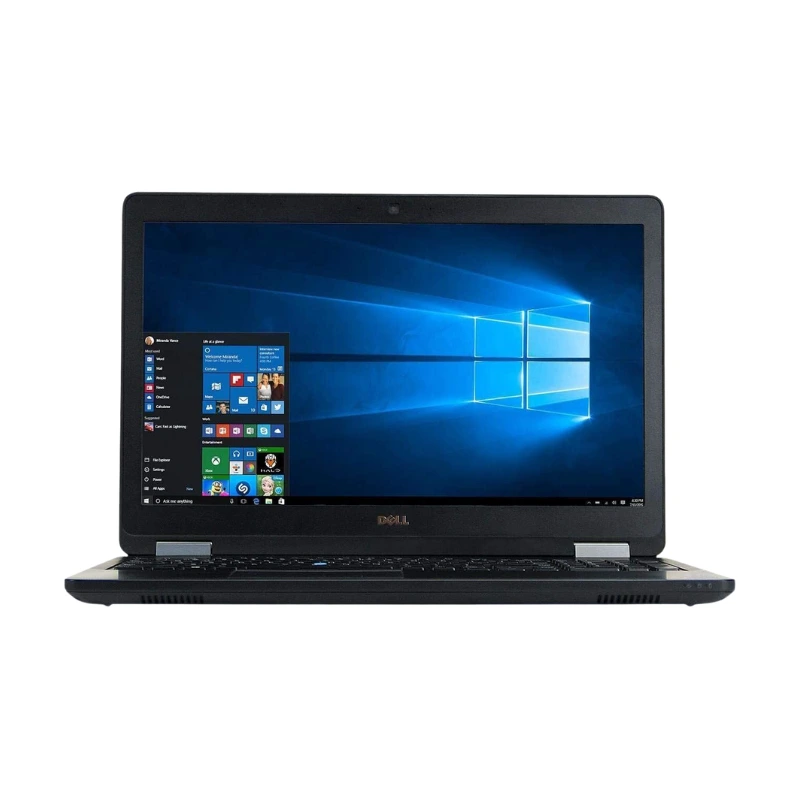
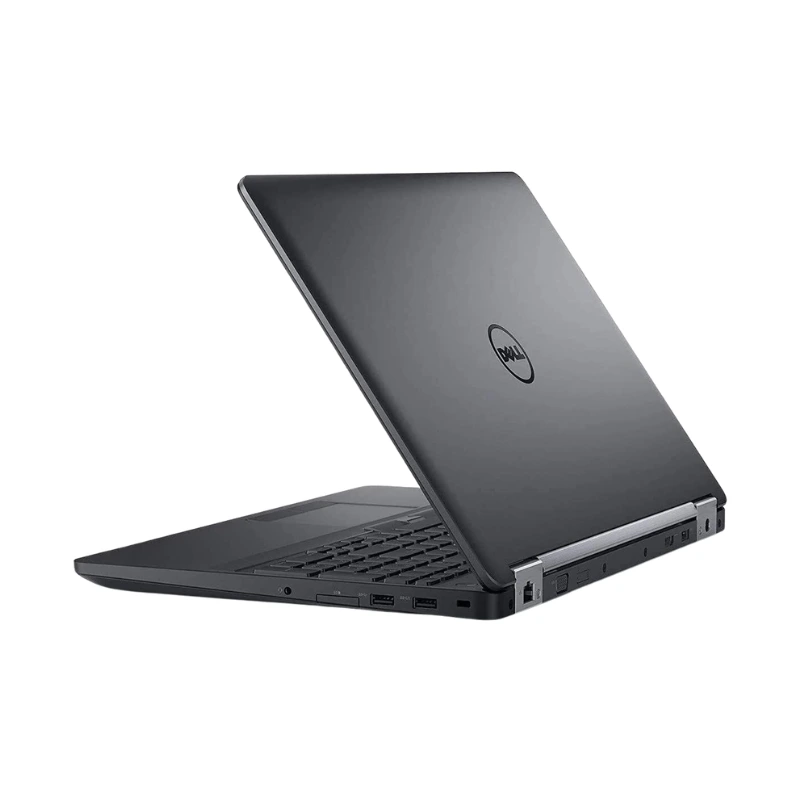
In Stock
₨36,000
The Dell Latitude E5570 Core i5 6th Gen with 8GB RAM and 256GB SSD is a durable 15.6-inch business laptop designed for office employees, accountants, students, freelancers, teachers and business owners.
Available at Alli Computer, this configuration combines a 6th Generation Intel Core i5 processor with 8GB DDR4 RAM and fast 256GB SSD storage.
The Dell Latitude E5570 is suitable for Microsoft Office, accounting software, inventory-management systems, online meetings, web browsing, data entry, educational work, basic programming and general business multitasking.
Its large display, full-size keyboard, numeric keypad, upgradeable memory and broad selection of business ports make it particularly useful for office and desk-based professional work.
Dell designed the Latitude E5570 platform around 6th-generation Intel processors and offered both U-series and higher-performance H-series configurations. Therefore, customers should confirm the exact Core i5 processor installed in the available unit.
The Dell Latitude E5570 features a practical and professional design developed for corporate, educational and institutional environments.
Its larger 15.6-inch chassis provides space for:
The laptop starts at approximately 2.09kg. It measures around 377.1mm wide and 252.6mm deep, while thickness varies slightly between touch and non-touch configurations.
Its professional design is suitable for:
The Latitude E5570 is more suitable for users who prioritise screen size, connectivity, upgradeability and comfortable desk-based operation than users looking for an ultra-light travel laptop.
The Dell Latitude E5570 platform supports 6th Generation Intel Core i5 processors.
Depending on its original configuration, the laptop may contain a power-efficient U-series processor or a higher-performance H-series processor. Dell’s official documentation identifies support for 6th-generation Core i5 and Core i7 processors across U- and H-series configurations.
The exact processor model affects:
For that reason, the exact processor number should be checked through the BIOS, Windows System Information or the laptop’s service tag before publishing detailed clock-speed claims.
The 6th-generation Core i5 processor provides suitable performance for common office, educational and business workloads.
The Dell Latitude E5570 can manage:
The laptop is primarily designed for productivity and business applications.
A standard integrated-graphics configuration is not intended for demanding modern gaming, advanced animation, professional 3D rendering or heavy GPU-based video production.
The installed 8GB DDR4 RAM provides dependable performance for normal office and educational multitasking.
It allows users to work with:
The Dell Latitude E5570 includes two memory slots and uses DDR4-2133 RAM.
Dell’s updated owner’s manual lists memory configurations ranging from 4GB to 32GB, with a maximum supported platform capacity of 32GB.
The installed 8GB may be configured as:
A single 8GB module may leave one slot available for an easier future upgrade. The exact arrangement should be checked before purchasing additional memory.
The laptop includes a 256GB solid-state drive, providing faster and more responsive everyday performance than a traditional mechanical hard drive.
The SSD provides:
The 256GB capacity provides suitable space for:
Dell designed the Latitude E5570 to support multiple storage formats.
Official platform options include:
The installed 256GB SSD may therefore be a 2.5-inch SATA drive, M.2 SATA drive or M.2 PCIe drive, depending on the individual unit.
Customers should confirm:
Depending on its internal configuration, the laptop may allow users to:
The required connector, mounting bracket and drive cable should be physically checked before planning an additional storage installation.
The Dell Latitude E5570 features a 15.6-inch display, providing a comfortable workspace for business, accounting and educational applications.
Dell offered the model with display options including:
The exact display resolution and touchscreen capability depend on the individual configuration.
The larger screen is useful for:
Customers should confirm the display resolution, touchscreen functionality, brightness and physical panel condition according to stock.
Non-touch HD and Full HD configurations use an anti-glare surface that can help reduce distracting reflections in:
Selected Full HD configurations include touchscreen support.
Touchscreen functionality should only be listed as confirmed after the display has been tested on the individual unit.
The exact integrated Intel graphics model depends on the installed Core i5 processor.
Power-efficient U-series processors generally use a different integrated graphics configuration from higher-performance H-series processors. Therefore, the exact Intel HD Graphics model should be confirmed through Windows Device Manager or the laptop’s processor number.
Integrated Intel graphics are suitable for:
The integrated graphics use shared system memory and are intended primarily for office, educational and multimedia use.
Selected Dell Latitude E5570 configurations were offered with AMD Radeon R7 M370 dedicated graphics.
A verified Radeon configuration may provide improved performance for:
Dell’s documentation lists AMD Radeon R7 M370 as an available graphics option.
Dedicated Radeon graphics should not be advertised unless the individual laptop has been physically checked and verified.
The standard listing should remain integrated Intel graphics when no dedicated GPU has been confirmed.
The Dell Latitude E5570 includes a full-size business keyboard with a dedicated numeric keypad.
The numeric keypad is particularly useful for:
The keyboard is also suitable for typing:
Keyboard layout, backlight availability, key condition and language should be confirmed according to the individual unit.
The Dell Latitude E5570 includes both modern and traditional display outputs.
Its video connections include:
These ports allow users to connect the laptop to:
External displays are useful for:
Dell officially lists both a 19-pin HDMI connector and a 15-pin VGA connector.
The Dell Latitude E5570 includes a practical range of business connections.
Its connectivity includes:
The PowerShare-enabled USB port can charge supported devices while the laptop is in selected power states, depending on BIOS and power settings.
Dell’s official documentation lists three USB 3.0 ports in total, including one PowerShare-enabled connection.
The Latitude E5570 supports business docking options.
Depending on its configuration, docking support may include:
A docking station can provide convenient access to:
Thunderbolt functionality should only be advertised when the individual laptop’s port and hardware configuration have been confirmed. Dell lists Thunderbolt cable docking as an optional platform feature.
The Dell Latitude E5570 supports wireless and wired networking.
Connectivity features may include:
The built-in Gigabit Ethernet port provides stable wired connectivity for offices, schools and businesses.
Bluetooth can be used with compatible:
The exact Wi-Fi card and optional wireless features should be confirmed according to the individual unit.
Selected Dell Latitude E5570 configurations include an external micro-SIM slot and optional mobile-broadband support.
This can be useful for:
A visible SIM slot does not automatically confirm that mobile data will work.
The laptop must also include:
Mobile-broadband capability should be verified before advertising the laptop as an LTE-enabled model.
Selected Latitude E5570 configurations include a webcam and integrated audio hardware for online communication.
The laptop is suitable for:
Audio connectivity includes a combined stereo headset and microphone port. Webcam availability and the condition of the camera, speakers and microphones should be checked on the individual unit.
The Dell Latitude E5570 offers several business-security options.
Depending on its configuration, these may include:
The owner’s manual documents removable optional fingerprint and smart-card hardware, confirming that these features were configuration-dependent.
Fingerprint and smart-card features should only be listed when they are present and functioning on the available laptop.
Dell offered the Latitude E5570 with two primary battery configurations:
The larger 84Wh battery can provide longer potential backup than the 62Wh option when both batteries are in similar condition.
Actual battery performance depends on:
Because this may be a used or refurbished laptop, customers should confirm:
Original manufacturer battery figures should not be treated as the expected backup time of every pre-owned unit.
Dell offered the Latitude E5570 with:
The required adapter depends on the installed processor, graphics configuration and original hardware setup.
Customers should confirm that the included Dell charger:
The Dell Latitude E5570 Core i5 is ideal for:
It is suitable for applications such as:
Buy the Dell Latitude E5570 Core i5 6th Gen with 8GB RAM and 256GB SSD in Pakistan from Alli Computer.
Customers should contact Alli Computer for the latest price, stock availability, exact processor model, display resolution, touchscreen capability, SSD interface, graphics configuration, keyboard backlight, fingerprint reader, smart-card reader, battery capacity, battery health, physical condition, charger, installed operating system and warranty information.
| Feature | Details |
|---|---|
| Product Name | Dell Latitude E5570 |
| Brand | Dell |
| Series | Latitude 5000 Series |
| Product Type | Business Laptop |
| Processor | Intel Core i5 6th Generation |
| Exact Processor Model | Confirm According to Stock |
| Processor Series | U-Series or H-Series, Depending on Unit |
| Processor Cores | Depend on Installed Processor |
| Processor Threads | Depend on Installed Processor |
| Processor Speed | Confirm According to Installed CPU |
| Processor Cache | Confirm According to Installed CPU |
| Installed Memory | 8GB RAM |
| Memory Type | DDR4-2133 |
| Memory Slots | Two SO-DIMM Slots |
| Maximum Platform Memory | Up to 32GB |
| Storage | 256GB SSD |
| SSD Interface | 2.5-Inch SATA, M.2 SATA or M.2 PCIe |
| Maximum M.2 SSD Support | Up to 512GB on Official Platform |
| Maximum 2.5-Inch SSD Support | Up to 512GB on Official Platform |
| Standard Graphics | Integrated Intel HD Graphics |
| Exact Intel Graphics | Depends on Processor |
| Optional Graphics | AMD Radeon R7 M370 |
| Display Size | 15.6 Inches |
| Display Resolution | HD or Full HD |
| HD Resolution | 1366 × 768 |
| Full HD Resolution | 1920 × 1080 |
| Refresh Rate | 60Hz |
| Display Surface | Anti-Glare on Non-Touch Models |
| Touchscreen | Optional Full HD Touchscreen |
| USB Ports | Three USB 3.0 Ports |
| USB PowerShare | Yes |
| HDMI Port | Yes |
| VGA Port | Yes |
| Ethernet Port | Gigabit RJ-45 |
| Card Reader | Up to SD 4.0 |
| SIM Slot | Optional Micro-SIM |
| Audio Port | Stereo Headset and Microphone Combination |
| Docking Support | Dell E-Dock |
| Thunderbolt Docking | Optional on Supported Configurations |
| Webcam | Confirm According to Stock |
| Keyboard | Full-Size Business Keyboard |
| Numeric Keypad | Yes |
| Keyboard Backlight | Optional |
| Fingerprint Reader | Optional |
| Smart-Card Reader | Optional |
| Wireless Connectivity | Wi-Fi and Bluetooth |
| Bluetooth Version | Bluetooth 4.1 on Supported Configurations |
| Mobile Broadband | Optional WWAN |
| Battery | 62Wh or 84Wh |
| Power Adapter | 65W or 90W, Depending on Configuration |
| Starting Weight | Approximately 2.09kg |
| Colour | Black |
| Operating System | Confirm Installed Version |
| Condition | Confirm According to Stock |
| Battery Health | Confirm According to Stock |
| Warranty | Confirm According to Stock |

No WhatsApp Number Found!
WhatsApp us
Reviews
There are no reviews yet.