
In Stock
₨30,000
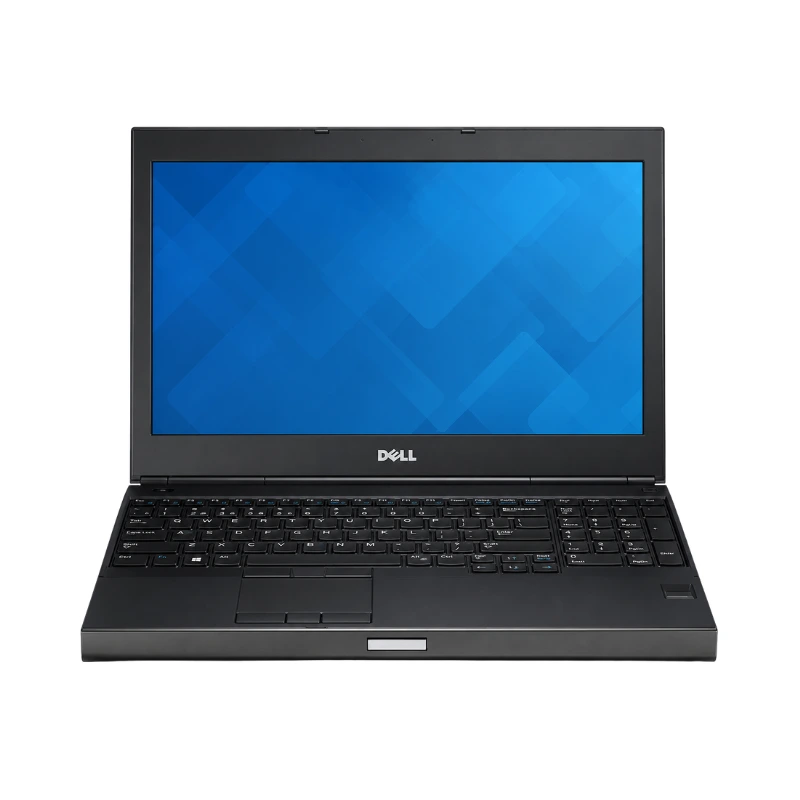
The Dell Precision M4800 Core i7 4th Gen with 8GB RAM and 256GB SSD is a powerful mobile workstation designed for engineers, architects, designers, developers, video editors and professional users who need more performance than a standard office laptop.
Available at Alli Computer, this configuration combines a 4th Generation Intel Core i7 processor with 8GB DDR3L RAM, fast 256GB SSD storage and dedicated professional workstation graphics.
Unlike an ordinary business notebook, the Precision M4800 was developed for demanding professional applications. Depending on its exact configuration, it may include NVIDIA Quadro K1100M, NVIDIA Quadro K2100M or AMD FirePro M5100 dedicated graphics with 2GB GDDR5 memory.
The workstation is suitable for:
The exact processor, graphics card and display configuration should be confirmed according to the individual unit available in stock.
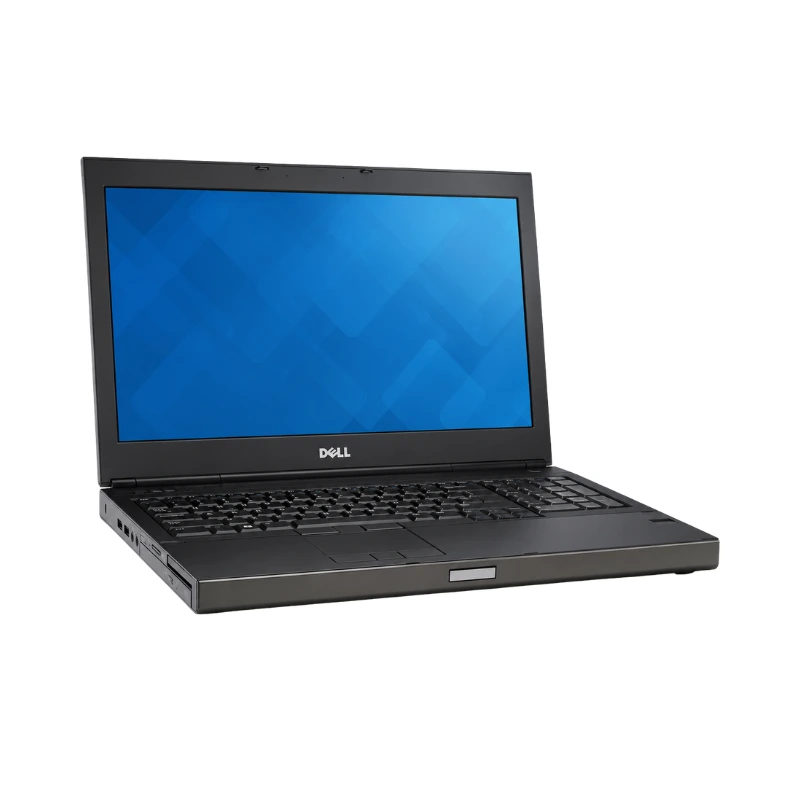
The Dell Precision M4800 features a durable workstation chassis manufactured using aluminium and magnesium-alloy materials.
Its solid construction is designed for professional environments where reliability, cooling and hardware upgradeability are more important than having the thinnest possible laptop.
The workstation is suitable for:
The Precision M4800 starts at approximately 2.89kg with selected configurations. It is considerably heavier than a standard 14-inch office laptop, but its larger body provides space for powerful components, extensive cooling, multiple storage devices and a wide selection of ports.
The Dell Precision M4800 platform supports 4th Generation Intel Core processors, including Core i7 quad-core and Core i7 Extreme configurations.
Dell’s official documentation lists support for:
The exact Core i7 processor model varies between individual units and should be checked through the BIOS, Windows System Information or Dell service tag before publishing specific clock speeds.
A quad-core Core i7 configuration provides strong performance for:
The Precision M4800 was developed for sustained professional workloads rather than only basic web browsing and document editing.
Its Core i7 processor can handle combinations such as:
Performance depends on the exact processor, RAM capacity, graphics card, storage drive, cooling condition and installed software.
The configured 8GB RAM is suitable for everyday professional work, but demanding CAD, rendering and virtualisation users may benefit from upgrading to 16GB or 32GB.
The installed 8GB DDR3L RAM provides suitable performance for office applications, programming, moderate design work and general professional multitasking.
It allows users to run:
Dell designed the Precision M4800 with DDR3L memory operating at 1600MHz or 1866MHz, depending on the processor and installed modules.
Core i7 quad-core and Core i7 Extreme configurations can provide four SO-DIMM memory slots and support up to 32GB RAM. Dual-core configurations support two slots and a maximum of 16GB.
Because this listing is for a Core i7 workstation, customers should confirm whether the installed processor is quad-core and whether all four memory slots are available.
The 8GB installed memory may be arranged as:
The exact arrangement affects the number of free slots available for future upgrades.
A RAM upgrade may improve performance when using:
Before upgrading, customers should confirm the installed processor, memory speed, module arrangement and maximum supported capacity.
The Dell Precision M4800 includes a 256GB SSD, providing substantially faster performance than a conventional mechanical hard drive.
The SSD improves:
The 256GB capacity is suitable for:
Users working with large video files, CAD projects or extensive data libraries may require additional storage.
Dell designed the Precision M4800 with support for multiple storage devices.
The workstation can support:
Dell’s official specification describes support for up to three storage devices when the primary drive bay, mSATA slot and optical-bay storage option are used.
The installed 256GB drive may be:
Customers should confirm the drive type, health, interface and remaining upgrade options according to the individual workstation.
The Dell Precision M4800 features a 15.6-inch display designed to provide enough workspace for technical and creative applications.
Dell offered several display options:
The QHD+ panel provides significantly more detail and workspace than the standard HD display, while the Full HD configuration offers a practical balance between resolution and software compatibility.
Customers should confirm the exact display resolution and condition according to stock.
The larger 15.6-inch display is useful for:
A higher-resolution Full HD or QHD+ panel offers more usable workspace for professional applications.
Actual colour quality, viewing angles and brightness depend on the specific panel installed in the individual workstation.
The Dell Precision M4800 uses an MXM Type-A dedicated workstation graphics card connected through a PCIe Gen 3 x16 interface.
Dell offered the following professional graphics options:
These graphics cards were developed for professional visualisation and workstation applications rather than only casual gaming.
The exact graphics card should be confirmed through Device Manager, GPU software or the Dell service tag.
The NVIDIA Quadro K1100M and K2100M configurations are suitable for compatible professional applications such as:
The Quadro K2100M is the stronger of the two listed NVIDIA workstation options.
Performance depends on the software version, driver support, project complexity, processor, RAM and cooling condition.
Selected Precision M4800 workstations include the AMD FirePro M5100 with 2GB GDDR5 memory.
This professional GPU is suitable for compatible:
The FirePro option should only be advertised when it has been confirmed on the individual unit.
Although the Precision M4800 includes dedicated graphics, it is primarily a professional workstation rather than a modern gaming laptop.
It can support:
However, modern demanding games may require reduced resolution and graphics settings.
Performance also varies considerably between the Quadro K1100M, Quadro K2100M and FirePro M5100 configurations.
The Dell Precision M4800 includes a full-size professional keyboard designed for extended typing and technical work.
It is suitable for:
Keyboard features may include:
The numeric keypad is particularly useful for accountants, engineers, data-entry users and professionals working with calculations.
Keyboard backlighting and layout should be confirmed according to the individual unit.
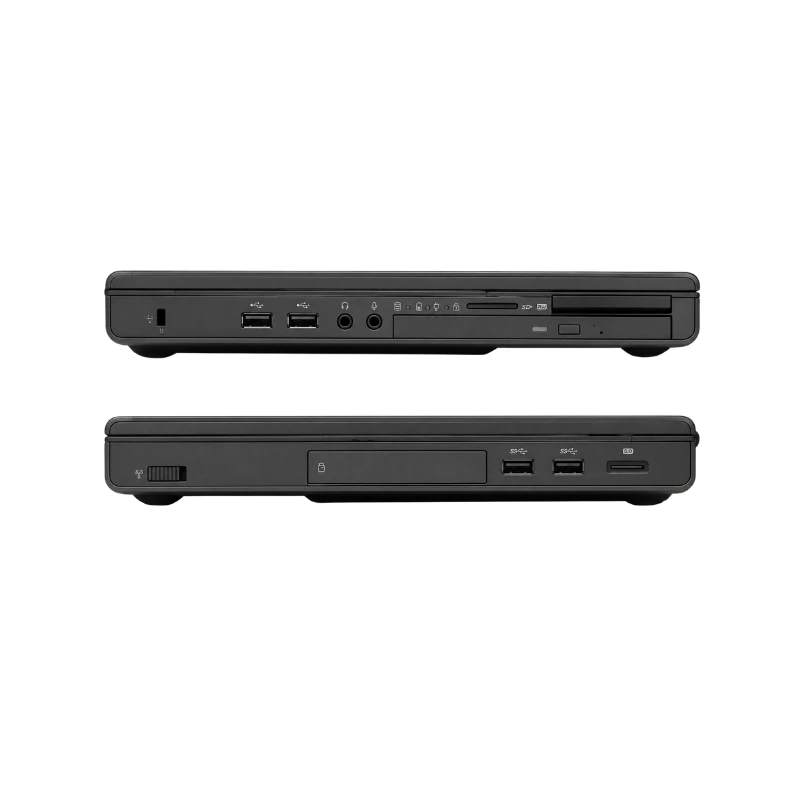
The Precision M4800 provides extensive USB connectivity for professional accessories.
Dell’s technical specifications list:
These ports allow users to connect:
The exact number and position of usable ports should be checked on the individual workstation.
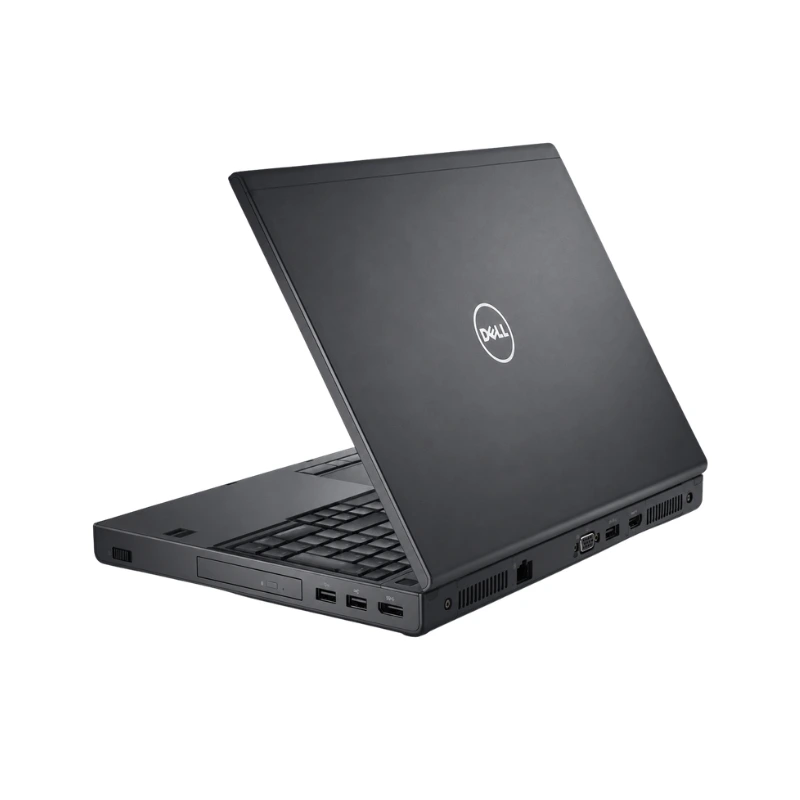
The Dell Precision M4800 includes an extensive selection of display connections:
This allows the workstation to connect to:
Dell lists a 15-pin VGA connector, 19-pin HDMI connector and 20-pin DisplayPort connector.
The combination is useful for:
The Dell Precision M4800 supports both wired and wireless networking.
Connectivity may include:
The built-in Ethernet adapter supports 10/100/1000Mbps network communication, making it suitable for offices and environments that require stable wired networking.
Bluetooth can be used with compatible:
The exact wireless card and supported Wi-Fi standard should be confirmed according to the individual workstation.
The Precision M4800 includes several professional expansion and security options.
Depending on configuration, these may include:
These features can be useful for corporate environments, photographers, technicians and professionals using specialised expansion hardware.
Optional features should be confirmed on the individual unit before being included as fixed product specifications.
The Dell Precision M4800 supports an integrated HD camera with:
The webcam is suitable for:
Camera availability and condition should be checked according to the individual unit.
The Dell Precision M4800 includes integrated dual-channel high-definition audio.
It provides separate audio connections for:
The audio system is suitable for online meetings, training videos, general media and professional communication.
Speaker, microphone and audio-port condition should be checked on the individual pre-owned workstation.
Depending on configuration, the Dell Precision M4800 may include:
The presence of fingerprint, smart-card and contactless security hardware should be confirmed according to the individual workstation.
Dell offered the Precision M4800 with several removable lithium-ion battery options:
Battery life depends on:
Dell’s documentation identifies the six-cell battery specifically for the M4800 and also lists nine-cell and nine-cell long-cycle-life options.
Because this is an older pre-owned workstation, customers should confirm:
The Dell Precision M4800 uses a high-capacity 180W power adapter.
The higher-wattage charger is required to support the workstation processor, dedicated graphics, storage devices and other internal components.
Customers should confirm that the included adapter:
Using an underpowered or unrecognised charger may reduce system performance or prevent proper battery charging.
As a high-performance mobile workstation, the Precision M4800 produces more heat than a basic office laptop.
Before sale, the unit should be checked for:
Proper cooling is particularly important when running CAD, rendering, video-editing or other sustained workloads.
The Dell Precision M4800 Core i7 is ideal for:
It is suitable for applications such as:
Software performance depends on the exact processor, graphics card, RAM capacity, SSD, operating system and software version.
Buy the Dell Precision M4800 Core i7 4th Gen with 8GB RAM and 256GB SSD in Pakistan from Alli Computer.
Customers should contact Alli Computer for the latest price, availability and exact unit specifications.
Before purchasing, confirm:
| Feature | Details |
|---|---|
| Product Name | Dell Precision M4800 |
| Brand | Dell |
| Series | Precision Mobile Workstation |
| Product Type | Professional Mobile Workstation |
| Processor | Intel Core i7 4th Generation |
| Processor Type | Quad-Core or Quad Extreme, Depending on Unit |
| Exact Processor | Confirm According to Stock |
| Processor Cache | Up to 8MB, Depending on Processor |
| Chipset | Mobile Intel 8 Series |
| Installed Memory | 8GB RAM |
| Memory Type | DDR3L |
| Memory Speed | 1600MHz or 1866MHz |
| Memory Slots | Up to Four SO-DIMM Slots with Quad-Core CPU |
| Maximum Memory | Up to 32GB with Quad-Core Processor |
| Storage | 256GB SSD |
| Primary Storage | 2.5-Inch SATA SSD or mSATA SSD |
| Additional Storage | Optical-Bay Drive Support |
| RAID Support | RAID 0, 1 or 5 on Supported Multi-Drive Configurations |
| Graphics Type | Dedicated Professional Workstation Graphics |
| NVIDIA Option | Quadro K1100M 2GB GDDR5 |
| Higher NVIDIA Option | Quadro K2100M 2GB GDDR5 |
| AMD Option | FirePro M5100 2GB GDDR5 |
| Display Size | 15.6 Inches |
| Display Options | HD, Full HD or QHD+ |
| HD Resolution | 1366 × 768 |
| Full HD Resolution | 1920 × 1080 |
| QHD+ Resolution | 3200 × 1800 |
| Refresh Rate | 60Hz |
| Keyboard | Full-Size Workstation Keyboard |
| Numeric Keypad | Yes |
| Keyboard Backlight | Optional |
| USB 3.0 | Four Ports |
| eSATA/USB Combination | Yes |
| HDMI | Yes |
| DisplayPort | Yes |
| VGA | Yes |
| Ethernet | Gigabit RJ-45 |
| Card Reader | SD 4.0 |
| ExpressCard | Yes |
| Smart-Card Reader | Optional |
| Micro-SIM | Available on Supported Configurations |
| Docking Connector | Yes |
| Webcam | Up to 720p HD |
| Wireless | Wi-Fi |
| Bluetooth | Bluetooth 4.0 on Supported Configurations |
| Mobile Broadband | Optional WWAN |
| Battery | Six-Cell or Nine-Cell Lithium-Ion |
| Power Adapter | 180W |
| Starting Weight | Approximately 2.89kg |
| Chassis Material | Aluminium and Magnesium Alloy |
| Colour | Dark Silver and Black |
| Operating System | Confirm Installed Version |
| Condition | Confirm According to Stock |
| Battery Health | Confirm According to Stock |
| Warranty | Confirm According to Stock |
No WhatsApp Number Found!
WhatsApp us
Reviews
There are no reviews yet.